
Field-tested in July 2026 on LinkedIn’s company admin UI (2024+ flow). Everything here is standalone — sample Python, sample REST, sample React — so an implementer or an AI agent can reproduce the behavior from this document alone. Field names like content_uuid and draft_id are illustrative; map them to your own schema.
LinkedIn’s composer lies to you. It renders a clean image preview for a corrupt file. It lets you click Post and quietly does nothing. It lets you type a comment that never saves. Each of these hands you a success signal for an action that did not happen — we call that a Phantom Success — and we hit every variant of it during the field test behind this guide.
What we wanted was simple: a company-page post with a native image, no external URL in the body, and the article link as the first comment on that same post. No Marketing API — there is no stable public API for this exact admin flow. What we ended up with is Playwright on a persistent logged-in session, plus a set of guards that refuse to believe any success signal until the state behind it checks out.
The guards are the guide. The Playwright calls are the easy part.
What you are building
Four phases. The operator touches exactly one of them — the review between draft and publish. Everything else is automation.
| Step | Who | What happens |
|---|---|---|
| Prepare | Backend (+ optional LLM) | Generate or load draft post text; persist draft row |
| Review | Frontend | Operator edits text; confirms publish |
| Publish | Backend + Playwright | Attach cover image → fill text → Post → add URL as first comment |
| Recover | Frontend | If the browser disconnects, poll until DB shows published |
Out of scope for this pattern: LinkedIn Marketing API organic posting with the same UX (admin composer, crop step, scoped comment on company feed). The validated approach is Playwright + persistent login session.
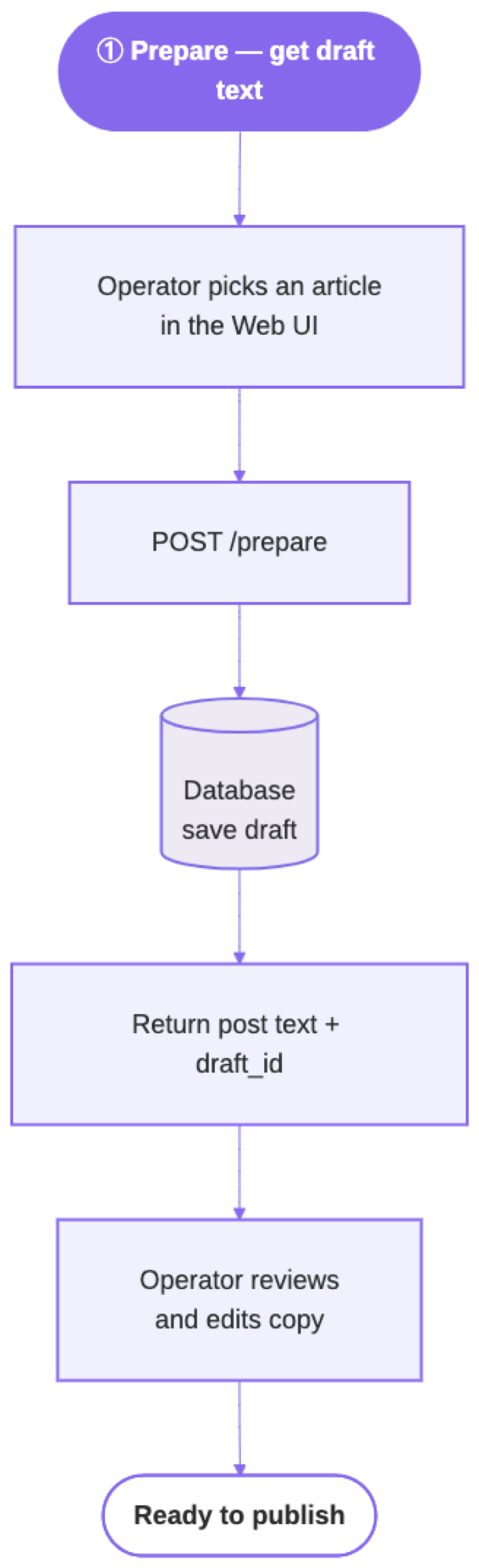
Design decisions (and why)
None of these are style preferences. Most rows were forced by a failure we hit during validation — the record at the bottom of this guide lists the exact root causes.
| Decision | Rationale |
|---|---|
| Playwright, not API-only | Company admin uses Create → Start a post → crop → Post. No stable public API for this exact 2024+ flow. |
| Link in first comment, not body | External URLs in the post body reduce reach; comment links avoid that penalty. |
| One persistent browser profile per human login | Company pages use the same session as the admin’s personal account. Store li_at once; post headless. |
| Image attach before text fill | Image crop/Next remounts Quill and wipes text filled earlier. |
| Scoped DOM selectors | Unscoped button:has-text('Post') hits Repost on the feed behind the modal. |
| Verify before comment | Post click alone is not success — composer must close. Comment only on card matched by text snippet. |
| Partial success = HTTP 200 | Post live + comment failed → SUCCESS + warning, not 502. |
| Long HTTP timeout + poll | Playwright publish with image often takes 2–5+ minutes. |
End-to-end architecture
Layer responsibilities
| Layer | Responsibility |
|---|---|
| linkedinlib | Pure Playwright: session, selectors, post, image, comment. No HTTP. |
| Publish handler | Auth, load draft, download cover, call post_to_linkedin, update DB |
| Prepare handler | Auth, optional LLM copy (~700 char validation on generated text), save draft, check_only for poll |
| Session ops | Headed login once; session_is_healthy before deploy; rsync profile to server |
| Frontend hook | fetchSyncRest (60 min), parse non-JSON errors, poll on disconnect |
Prerequisites
pip install playwright
playwright install chromium
playwright install chrome   # recommended for headless posting on macOS
Code language: PHP (php)
Dependencies: Python 3.10+, Playwright 1.58+, a server with enough RAM for Chromium (512 MB+ per context).
Reverse proxy: Set read timeout ≥ 3600 seconds on publish routes. A 60-second gateway timeout produces false “Load failed” in the browser while Playwright still runs.
Session model
One human logs in once, in a headed browser. Every publish after that runs headless and unattended — the Chromium profile directory is the entire artifact.
One login, many targets
LINKEDIN_ACCOUNTS = {
    "personal_admin": {
        "type": "personal",
        "start_url": "https://www.linkedin.com/feed/",
        "posts_url": "https://www.linkedin.com/in/your-handle/recent-activity/all/",
        "posts_published_url": "https://www.linkedin.com/in/your-handle/recent-activity/all/",
        "session_account": "admin",  # owns Chromium profile
    },
    "brand_page": {
        "type": "company",
        "start_url": "https://www.linkedin.com/company/your-brand/",
        # Numeric company ID from admin URL bar — slug-based admin paths often 404
        "posts_url": "https://www.linkedin.com/company/12345678/admin/page-posts/",
        "posts_published_url": "https://www.linkedin.com/company/12345678/admin/page-posts/published/",
        "session_account": "admin",  # same profile as personal_admin
    },
}
Code language: JSON / JSON with Comments (json)
Interactive login (headed, once per operator)
Use bundled Chromium with headless=False — not channel="chrome" (headed Chrome + custom profile can hang on macOS). Reuse the same context options as headless publish (viewport, locale, stealth args).
from playwright.sync_api import sync_playwright

SESSION_DIR = "data/linkedin_sessions/admin"
PLAYWRIGHT_CONTEXT_OPTS = {
    "args": ["--disable-blink-features=AutomationControlled", "--disable-dev-shm-usage"],
    "viewport": {"width": 1920, "height": 1080},
    "device_scale_factor": 2,
    "locale": "en-US",
    "timezone_id": "America/Los_Angeles",
    "color_scheme": "light",
}
STEALTH_INIT = """
Object.defineProperty(navigator, 'webdriver', { get: () => undefined });
Object.defineProperty(navigator, 'languages', { get: () => ['en-US', 'en'] });
Object.defineProperty(navigator, 'plugins', { get: () => [1, 2, 3, 4, 5] });
window.chrome = window.chrome || { runtime: {} };
Object.defineProperty(navigator, 'hardwareConcurrency', { get: () => 8 });
Object.defineProperty(navigator, 'deviceMemory', { get: () => 8 });
"""

def launch_session_context(p, session_dir):
    return p.chromium.launch_persistent_context(
        session_dir, headless=False, **PLAYWRIGHT_CONTEXT_OPTS
    )

def confirm_feed_login(context, page):
    """Return True when li_at cookie exists or feed nav is visible."""
    cookies = context.cookies()
    if any(c["name"] == "li_at" for c in cookies):
        return True
    try:
        page.wait_for_selector("nav[aria-label='Primary Navigation']", timeout=5_000)
        return True
    except Exception:
        return False

with sync_playwright() as p:
    ctx = launch_session_context(p, SESSION_DIR)
    ctx.add_init_script(STEALTH_INIT)
    page = ctx.pages[0] if ctx.pages else ctx.new_page()
    page.goto("https://www.linkedin.com/login", wait_until="domcontentloaded", timeout=30_000)
    while True:
        answer = input(
            "\nWhen your LinkedIn feed is visible, press ENTER to save (q to quit): "
        ).strip().lower()
        if answer == "q":
            ctx.close()
            raise SystemExit("Aborted — session not saved.")
        if confirm_feed_login(ctx, page):
            break
        print("Login not detected — finish sign-in in the browser, then press ENTER again.")
    ctx.close()
Code language: Python (python)
How cookies are created (and what you store)
You do not export or paste cookies manually. LinkedIn’s session cookie (li_at) is written automatically when an operator completes login in a headed Playwright persistent context. The whole Chromium profile directory is the artifact — typically:
data/linkedin_sessions/{session_owner}/
  Default/
    Cookies          ← SQLite DB; li_at lives here after login
    ...
Code language: PHP (php)
Company page targets reuse the same profile as the personal admin account (session_account in the registry). Run interactive login once for the owner; both personal and company posting read that profile.
Session health checks
Use two filesystem checks before deploy or batch jobs — no browser, no LinkedIn request (headless probes on /feed/ often false-fail anti-bot):
import sqlite3
import time
from contextlib import closing
from pathlib import Path

from errors import LinkedInError  # linkedinlib/errors.py

LINKEDIN_AUTH_COOKIE = "li_at"
SESSION_MAX_AGE_DAYS = 14  # LinkedIn sessions often last 30–60 days; 14 is a safe buffer

def session_has_auth_token(session_dir: str) -> bool:
    """True when li_at exists for linkedin.com in the Chromium Cookies DB."""
    cookies_db = Path(session_dir) / "Default" / "Cookies"
    if not cookies_db.exists():
        return False
    try:
        with closing(sqlite3.connect(f"file:{cookies_db}?mode=ro", uri=True)) as conn:
            row = conn.execute(
                "SELECT 1 FROM cookies WHERE name = ? AND host_key LIKE '%linkedin%' LIMIT 1",
                (LINKEDIN_AUTH_COOKIE,),
            ).fetchone()
            return row is not None
    except sqlite3.OperationalError as exc:
        if "locked" in str(exc).lower():
            return False  # browser still open on this profile
        raise LinkedInError(
            f"Could not read LinkedIn session cookies at {cookies_db}: {exc}"
        ) from exc

def is_session_fresh(session_dir: str, max_age_days: int = SESSION_MAX_AGE_DAYS) -> bool:
    """True when Default/Cookies was modified within max_age_days."""
    cookies_path = Path(session_dir) / "Default" / "Cookies"
    if not cookies_path.exists():
        return False
    age_days = (time.time() - cookies_path.stat().st_mtime) / 86400
    return age_days <= max_age_days

def session_is_healthy(session_dir: str, max_age_days: int = SESSION_MAX_AGE_DAYS) -> bool:
    return session_has_auth_token(session_dir) and is_session_fresh(session_dir, max_age_days)
Code language: Python (python)| Check | What it proves | What it does not prove |
|---|---|---|
session_has_auth_token | Login completed (li_at on disk) | Token still accepted by LinkedIn |
is_session_fresh | Cookies file recently written | Same — age is a proxy only |
| Live feed probe (optional) | Nav visible on /feed/ | Triggers anti-bot on headless Chromium — avoid in deploy scripts |
post_to_linkedin should fail fast with a clear “run session init” message when li_at is missing — do not start LLM/image work first.
Keeping the session up to date
| When | Action |
|---|---|
| First setup | Headed interactive login (above) until feed loads; verify session_has_auth_token |
| Before local dev / manual publish | Run session_is_healthy; if false → re-run interactive login |
| Before deploy to server | Health check locally; rsync profile only when healthy — if stale, warn and skip rsync (do not block deploy on headed login) |
| On server (cron / API publish) | Headless post only — never open interactive login during deploy, CI, or SSH |
Refresh flow when health fails:
- On your local machine, run interactive session init (headed browser).
- Confirm
session_is_healthy(session_dir)returns true. - Rsync
data/linkedin_sessions/{owner}/to the production host (gitignore this dir — never commit cookies). - Re-run headless publish.
Dev-server preflight (recommended): at app startup, call session_is_healthy; if false, prompt the operator to run session init interactively before accepting publish requests. In non-interactive shells, log a warning and skip the browser prompt — do not block deploy on headed login.
Ops CLI (optional wrapper)
A thin shell or Makefile around the Python helpers keeps operators out of the weeds:
# Examples — implement as linkedin_ops.sh or similar
./linkedin_ops.sh session-init admin      # headed login, save profile
./linkedin_ops.sh session-status          # li_at + freshness per account
./linkedin_ops.sh session-health admin 14   # exit 0 only if li_at + Cookies < 14 days
./linkedin_ops.sh post brand_page "TEST — DELETE ME"   # headless smoke test
Code language: PHP (php)
Wire deploy like this:
SESSION_DIR="data/linkedin_sessions/admin"
if ./linkedin_ops.sh session-health admin 14; then
  rsync -az "$SESSION_DIR/" "deploy@your-server:/app/data/linkedin_sessions/admin/"
else
  echo "WARNING: LinkedIn session missing or stale — skipping session sync to server"
  echo "Refresh locally: ./linkedin_ops.sh session-init admin"
  # Deploy continues; headless publish on the server fails until you rsync a fresh profile
fi
Code language: PHP (php)
Never run session-init on the server during unattended deploy — it requires a human at the browser.
Browser launch: headed vs headless (validated behavior)
| Mode | Browser | Notes |
|---|---|---|
| Session init | Bundled Chromium, headless=False | channel=chrome + headed + custom profile can hang on macOS |
| Publish | Chrome first (channel="chrome", ignore_default_args=["--enable-automation"]), fallback Chromium | LinkedIn blocks headless bundled Chromium more often |
Headless launch pattern:
def _with_stealth(context):
    """Apply the stealth init script to every current and future page, then return it."""
    context.add_init_script(STEALTH_INIT)  # runs before page scripts on each navigation
    return context

def launch_linkedin_context(p, session_dir, headless=True):
    clear_stale_profile_lock(session_dir)  # Chromium SingletonLock
    # base_opts must NOT set `channel` or `ignore_default_args` itself — this
    # function supplies those per-attempt, and a duplicate kwarg raises TypeError.
    base_opts = get_playwright_context_options()  # viewport, locale, launch args
    if not headless:
        return _with_stealth(
            p.chromium.launch_persistent_context(session_dir, headless=False, **base_opts)
        )
    for extra in ({"channel": "chrome", "ignore_default_args": ["--enable-automation"]}, {}):
        try:
            return _with_stealth(
                p.chromium.launch_persistent_context(
                    session_dir, headless=True, **base_opts, **extra
                )
            )
        except Exception:
            if not extra:
                raise LinkedInError("Could not launch LinkedIn browser context")
Code language: Python (python)
Shared context options: 1920×1080 viewport, device_scale_factor=2, locale="en-US", timezone_id="America/Los_Angeles", color_scheme="light", --disable-blink-features=AutomationControlled. The stealth init script is attached via add_init_script (above) so it runs on every page — do not rely on the caller to add it.
Stealth init (this snippet already sets webdriver, languages, plugins, window.chrome, hardwareConcurrency, and deviceMemory; a full implementation also adds a permissions.query override and other fingerprint surfaces):
Object.defineProperty(navigator, 'webdriver', { get: () => undefined });
Object.defineProperty(navigator, 'languages', { get: () => ['en-US', 'en'] });
Object.defineProperty(navigator, 'plugins', { get: () => [1, 2, 3, 4, 5] });
window.chrome = window.chrome || { runtime: {} };
Object.defineProperty(navigator, 'hardwareConcurrency', { get: () => 8 });
Object.defineProperty(navigator, 'deviceMemory', { get: () => 8 });
Code language: JavaScript (javascript)
Profile lock: Chromium writes SingletonLock in the session dir. Clear stale locks when the owning PID is gone; fail fast if another browser still holds the profile.
Core Python API
POST_MAX_RETRIES = 3
POST_RETRY_BASE_DELAY_S = 5
POST_MAX_CHARS = 3000

def post_to_linkedin(
    account: str,
    message: str,
    *,
    image_path: str | None = None,
    link: str | None = None,
    headless: bool = True,
) -> dict | None:
    """
    Returns:
        None — full success (post + comment if link provided)
        {"image_skipped": True, "image_skip_reason": str} — posted text-only
        {"comment_failed": True, "comment_error": str} — post live, comment failed
        Both image_skipped and comment_failed may appear in one dict.

    Raises:
        LinkedInError — auth failure, post did not publish, retries exhausted
    """
Code language: Python (python)
Retries apply to transient Playwright/network errors (Timeout, Navigation failed, net::ERR_*, browser closed). LinkedInError is not retried. Backoff: POST_RETRY_BASE_DELAY_S * 2 ** (attempt - 1) → 5 s, 10 s, 20 s.
Retry safety invariant (avoid double-posting). The retry wraps the whole compose→submit→comment sequence. If a transient error escapes after the post is already live (e.g. a Timeout during feed navigation or add_first_comment), a naive retry re-runs submit_post and creates a second post. Two rules keep retries safe:
- Every post-submit step must raise only
LinkedInError—verify_post_submitted, the goto-feed navigation, andadd_first_commentmust catch their own PlaywrightTimeout/nav errors and re-raise asLinkedInError(which is not retried). A bare transient error must never escape once the composer has closed. - Idempotency guard on retry ≥ 2: before composing again, re-check the published feed for a card matching the post snippet (same matcher used for commenting). If the post is already live, skip compose/submit and jump straight to the comment step. This closes the window structurally, not by discipline alone.
Two char limits: marketing copy generation caps at 700 chars with additional rules (hook first line ≤ 60 chars; last line exactly 3 hashtags; first tag from your brand’s allowed niche set — retry LLM once on validation failure). Platform validate_message allows up to 3000 chars for the post body passed to Playwright.
import re

NICHE_FIRST_HASHTAGS = {"YourNicheA", "YourNicheB"}  # first hashtag on last line must be one of these

def validate_linkedin_post(text: str, max_chars: int = 700) -> tuple[bool, str]:
    cleaned = (text or "").strip()
    if not cleaned:
        return False, "empty post"
    if len(cleaned) > max_chars:
        return False, f"post is {len(cleaned)} chars — max {max_chars}"
    first_line = cleaned.splitlines()[0].strip()
    if len(first_line) > 60:
        return False, f"hook is {len(first_line)} chars — max 60"
    last_line = cleaned.splitlines()[-1].strip()
    tags = re.findall(r"#(\w+)", last_line)
    if len(tags) != 3:
        return False, f"last line must have exactly 3 hashtags, found {len(tags)}"
    if tags[0] not in NICHE_FIRST_HASHTAGS:
        return False, f"first hashtag must be one of: {', '.join('#' + t for t in sorted(NICHE_FIRST_HASHTAGS))}"
    return True, ""
Code language: Python (python)
validate_linkedin_post gates LLM-generated copy (700-char rules) before the review UI. The platform limit is separate: validate_message runs at post_to_linkedin entry and enforces POST_MAX_CHARS (3000) on the operator-approved body actually passed to Playwright — LinkedIn rejects longer bodies.
def validate_message(message: str, max_chars: int = POST_MAX_CHARS) -> None:
    """Raise LinkedInError before browser launch when the body is empty or too long."""
    body = (message or "").strip()
    if not body:
        raise LinkedInError("post message is empty")
    if len(body) > max_chars:
        raise LinkedInError(f"post is {len(body)} chars — max {max_chars}")
Code language: Python (python)
When image_path is not None, validate_linkedin_image_file runs at post_to_linkedin entry (before browser launch) — corrupt paths fail fast. validate_message runs at the same entry point, before any browser or image work.
Company page posting flow (step-by-step)
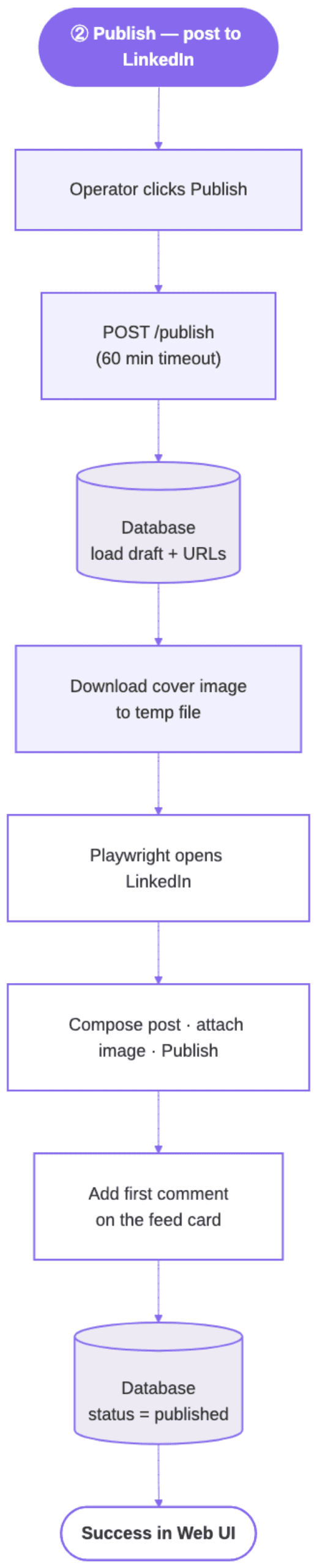
Validated order for company type:
- Launch persistent context;
page.set_default_timeout(30_000) - Company preflight: if
li_atis not on disk, open personal feed and confirm logged-in nav; if cookie already saved from session-init, skip the feed probe (headless Chromium on/feed/can false-fail even with valid session) page.goto(start_url)- Assert not redirected to login gate
- Dismiss upsell modal if present (
button[data-test-modal-close-btn], etc.) — blocks Create otherwise - Click Create → menu item Start a post (
a[data-test-org-menu-item='POSTS']) - Land on
/admin/page-posts/published/?share=truewith composer open - If
image_path: - Try hidden
input[type=file]first; else click Add media set_input_files(path)→advance_past_image_editor(Next, up to 90 s)wait_for_media_upload_settled(up to 120 s, stable Post ~3 s)- On attach failure: continue text-only with
image_skippedmetadata (do not abort) fill_post_content(message)— always after image when image was attempted- Human-like pause 1000–2500 ms
submit_post(max_attempts=3)— retry if composer stays openverify_post_submitted— composer Post button must disappear (max 60 s)- If
link:add_first_comment— skip entirely when article URL is missing
Personal profile: open feed → Start a post → same image/text order → Post → comment on personal feed variant.
Selector reference (field-tested lists)
Scope composer actions to .share-creation-state. Never use global button:has-text('Post'). Lists below are abbreviated — keep full fallback arrays in your selectors.py and update when LinkedIn changes the admin DOM.
Composer — image
IMAGE_BTN_SELECTORS = [
    ".share-creation-state button[aria-label='Add media']",
    ".share-creation-state button[aria-label*='Add media']",
    ".share-creation-state button[aria-label*='Add an image']",
    ".share-creation-state button[aria-label*='Add a photo']",
    ".share-box-feed-entry__container button[aria-label*='Add media']",
    "button[data-test-id='share-media-upload']",
    # ... additional composer-scoped fallbacks
]
IMAGE_INPUT_SELECTORS = [
    ".share-creation-state input[type='file']",
    ".share-box-feed-entry__container input[type='file']",
    ".share-box input[type='file']",
    "input[type='file'][accept*='image']",
    "input[type='file'][accept*='.png']",
    "input[type='file'][accept*='.jpg']",
]
IMAGE_EDITOR_NEXT = [
    ".share-creation-state button.share-box-footer__primary-btn",
    "button.share-box-footer__primary-btn[aria-label='Next']",
    "button[aria-label='Next']",
]
Code language: PHP (php)
Composer — submit
SUBMIT_BTN_SELECTORS = [
    ".share-creation-state button.share-actions__primary-action",
    "button.share-actions__primary-action",
    "button[aria-label='Post']",  # last resort — prefer scoped selectors above
    "button[class*='share-actions__primary']",
]
POST_CONFIRM_SELECTORS = [
    ".feed-new-update-pill",
    ".share-box-footer__post-button[disabled]",
    ".artdeco-toast-item--visible",
]
Code language: PHP (php)
Published feed — comment (company admin)
COMMENT_TRIGGER_SELECTORS = [
    "button[aria-label='Comment']",           # prefer first on admin cards
    "div[aria-placeholder*='Comment as']",    # "Comment as Brand…"
    "div[aria-placeholder*='Add a comment']",
    "div[aria-label*='Add a comment'][contenteditable='true']",
    ".comments-comment-texteditor .ql-editor[contenteditable='true']",
    ".comments-comment-box .ql-editor[contenteditable='true']",
    "div[aria-placeholder*='omment']",
]
COMMENT_EDITOR_SELECTORS = [
    ".comments-comment-box__form-container .ql-editor",  # most specific
    ".comments-comment-texteditor .ql-editor[contenteditable='true']",
    ".comments-comment-box .ql-editor[contenteditable='true']",
    "div[aria-placeholder*='Add a comment'][contenteditable='true']",
]
COMMENT_SUBMIT_READY = [
    ".comments-comment-box button:has-text('Comment'):not([disabled])",
    "button.comments-comment-box__submit-button--cr:not([disabled])",
    "button.comments-comment-box__submit-button:not([disabled])",
    "button[aria-label='Post comment']:not([disabled])",
]
Code language: PHP (php)
Do not use unscoped button:has-text('Post') or unscoped Add a photo — they match feed chrome behind the modal.
Image validation (mandatory)
This is the purest Phantom Success in the whole flow. LinkedIn happily renders “Image preview” for an invalid file — ours was a 57-byte .jpg full of garbage bytes — then Post silently no-ops and the composer stays open. No error, no toast, nothing.
from pathlib import Path

def validate_linkedin_image_file(path: str | Path) -> None:
    p = Path(path)
    if not p.exists():
        raise LinkedInError(f"image_path not found: {path}")
    if not p.is_file():
        raise LinkedInError(f"image_path is not a file: {path}")
    if p.suffix.lower() not in {".jpg", ".jpeg", ".png", ".gif"}:
        raise LinkedInError(f"Unsupported image format '{p.suffix}' — use .jpg, .jpeg, .png, .gif")
    size = p.stat().st_size
    if size < 512:
        raise LinkedInError(f"image_path too small ({size} bytes) — likely corrupt or empty")
    header = p.read_bytes()[:12]
    magic_ok = (
        header[:3] == b"\xff\xd8\xff"
        or header[:8] == b"\x89PNG\r\n\x1a\n"
        or header[:6] in (b"GIF87a", b"GIF89a")
    )
    if not magic_ok:
        raise LinkedInError(f"image_path is not a valid JPEG/PNG/GIF (bad magic bytes): {path}")
Code language: Python (python)
Call before set_input_files and after downloading a remote cover to a temp path.
Remote cover download (generic CMS pattern)
from contextlib import contextmanager
import os
import tempfile
import requests

@contextmanager
def cover_image_for_content(content_id: int | None):
    """Yield local path or None. Never raise — text-only fallback."""
    url = get_presigned_cover_url(content_id)  # your CMS/storage layer
    if not url:
        yield None
        return
    with tempfile.TemporaryDirectory() as tmp:
        path = os.path.join(tmp, "cover.png")
        local = None
        try:
            resp = requests.get(url, timeout=30)
            resp.raise_for_status()
            with open(path, "wb") as f:
                f.write(resp.content)
            validate_linkedin_image_file(path)  # raises LinkedInError on bad bytes
            local = path
        except Exception:
            local = None  # download or validation failed → text-only fallback
        # Single yield, OUTSIDE any try/except. A consumer exception re-enters the
        # generator here and propagates normally — it can never be swallowed, and
        # there is no second reachable yield to trigger "generator didn't stop".
        yield local  # inside TemporaryDirectory so file lives through post_to_linkedin
Code language: Python (python)
Post body vs comment body (Quill injection)
| Editor | Validated injection | Why |
|---|---|---|
| Post body | document.execCommand('insertText', false, text) after clicking .ql-editor | Fast for long copy; works after image attach |
| Comment | editor.press_sequentially(url, delay=20) or page.keyboard.type | execCommand fires input only — Quill never enables Comment button |
Why the asymmetry (not a mistake — use the right tool per editor): the post composer enables Post as soon as Quill holds any content, which the insertText input event provides. The comment box gates Comment on the React key-event state (keydown/keyup), which execCommand does not synthesize — so only real per-character key events (press_sequentially/keyboard.type) flip the submit button to enabled. Do not “simplify” the comment path back to execCommand.
After typing the URL in a comment, wait ≥ 1500 ms (page.wait_for_timeout(1500)) for link unfurl before clicking submit. Focus editor explicitly after trigger click (800 ms beat).
Comment submit: poll for :not([disabled]) up to 25 s. Fallback: Control+Return then Meta+Return.
Comment verification: poll comment items inside the target post card only every 2 s for up to 20 s — never document.body.innerText (includes the open editor).
Locate the correct post for commenting
def post_body_snippet(message: str, max_len: int = 64) -> str:
    for line in message.splitlines():
        if line.strip():
            return line.strip()[:max_len]
    return message.strip()[:max_len]
Code language: Python (python)- Navigate to
posts_published_url(fallback:posts_url) without?share=true - Poll up to 90 s: first wait 10 s, then 5 s between reloads
- On attempt 1 or whenever URL contains
share=true:goto(clean_posts_url); elsereload - Find smallest feed card whose text contains
snippetand has a comment placeholder (Comment as/Add a comment) - Tag card with a data attribute (e.g.
data-li-post-target="1") — all comment locators scoped to[data-li-post-target='1']. Any stable attribute name works if scoped consistently. - Never click the first comment box on the page without snippet match
Comment submit wait: 25 s for :not([disabled]). Comment verify poll: 20 s scoped to card.
Compose phase (inside post_to_linkedin)
After browser launch, auth, and open_post_modal, the compose/submit/comment sequence is:
def compose_submit_and_comment(page, account, message, image_path, link, *, attempt=1):
    """Single attempt after the post composer is open.

    Retry safety: on attempt >= 2 the post may already be live from a prior
    attempt that failed *after* submit. Re-check the feed first and skip
    compose/submit when the card already exists — otherwise we double-post.
    """
    if attempt > 1 and post_already_live(page, account, message):
        # Post landed on a previous try; do not compose again — go straight to comment.
        return _comment_only(page, account, message, link)

    human_pause(page)  # 600–1800 ms before interacting

    image_meta = None
    if image_path is not None:
        if not attach_image(page, image_path):
            reason = (
                "Cover image could not be attached — media button/input not found; "
                "posted text-only."
            )
            image_meta = {"image_skipped": True, "image_skip_reason": reason}
        else:
            human_pause(page, 400, 900)  # brief beat after crop/Next

    fill_post_content(page, message)  # AFTER image — crop step remounts Quill

    human_pause(page, 1000, 2500)
    submit_post(page)  # max_attempts=3 by default
    # From here on the post is (or may be) live. Every step below MUST convert its
    # own Playwright Timeout/nav errors to LinkedInError — a bare transient error
    # that escapes now would be retried and create a SECOND post.
    verify_post_submitted(page, message)

    if not link:
        return image_meta

    comment_meta = _add_comment_capture(page, account, message, link)
    if comment_meta:
        if image_meta:
            image_meta.update(comment_meta)
            return image_meta
        return comment_meta

    return image_meta


def _add_comment_capture(page, account, message, link):
    """Return comment-failure metadata, or None on success. Never raises for a
    comment problem — comment failure is partial success, not a retryable error."""
    try:
        add_first_comment(page, account, link, post_message=message)
        return None
    except LinkedInError as exc:  # add_first_comment must wrap Timeouts as LinkedInError
        return {"comment_failed": True, "comment_error": str(exc)}


def _comment_only(page, account, message, link):
    """Post already live from a prior attempt — add the comment only."""
    if not link:
        return None
    return _add_comment_capture(page, account, message, link)
Code language: Python (python)
post_to_linkedin wraps this in session launch, company preflight, navigation, retries (3× with 5/10/20 s backoff, passing the incrementing attempt), and validate_message + validate_linkedin_image_file at entry. post_already_live reuses the snippet matcher from Locate the correct post for commenting against posts_published_url.
Upload settle (before Post)
After Next on crop step, poll until:
- No visible progress/spinner inside
.share-creation-state - Post button visible, enabled, not showing “Posting…”
- State stable for 6 × 500 ms = 3 seconds
REST API contract (validated shapes)
Use two routes on your sync REST allowlist (long timeout, no generic 503 interceptor masking). Both prepare and publish must use the long-timeout fetch on the client — prepare can call an LLM and publish runs Playwright.
All requests require session auth fields (example: session_email, session_id) in the JSON body.
POST /content/linkedin/prepare
Request:
{
  "content_uuid": "550e8400-e29b-41d4-a716-446655440000",
  "session_email": "operator@example.com",
  "session_id": "…",
  "check_only": false,
  "regenerate": false
}
Code language: JSON / JSON with Comments (json)| Field | Purpose |
|---|---|
check_only: true | Poll / open-flow check — no LLM |
regenerate: true | Force new copy when draft exists (400 if already published) |
Prepare prerequisites: session auth valid (401 if not); published article URL available in your CMS or content store; linkedin_account configured for the workspace or org. Returns 400 if no LinkedIn account is configured; 400 if prepare LLM/validation fails.
Response (generate):
{
  "status": "SUCCESS",
  "post_text": "Hook line…\n\nBody…\n\n#Tag1 #Tag2 #Tag3",
  "draft_id": 42
}
Code language: JSON / JSON with Comments (json)
Response (check_only, no draft yet):
{ "status": "SUCCESS", "already_saved": false }
Code language: JSON / JSON with Comments (json)
Response (check_only or open-flow, draft exists, not published):
{
  "status": "SUCCESS",
  "post_text": "…",
  "draft_id": 42,
  "social_status": "draft",
  "already_saved": true
}
Code language: JSON / JSON with Comments (json)
Response (poll / already published):
{
  "status": "SUCCESS",
  "post_text": "…",
  "draft_id": 42,
  "social_status": "published",
  "post_url": "https://www.linkedin.com/company/12345678/admin/page-posts/published/",
  "already_saved": true
}
Code language: JSON / JSON with Comments (json)
Poll success condition: already_saved === true && social_status === "published".
Always return "status": "SUCCESS" explicitly — do not rely on a generic serializer that omits status.
POST /content/linkedin/publish
Request:
{
  "draft_id": 42,
  "post_text": "Final text operator approved in UI",
  "session_email": "operator@example.com",
  "session_id": "…"
}
Code language: JSON / JSON with Comments (json)
Success:
{ "status": "SUCCESS", "message": "Posted to LinkedIn successfully." }
Code language: JSON / JSON with Comments (json)
Idempotent (already published):
{
  "status": "SUCCESS",
  "message": "Already published to LinkedIn.",
  "already_published": true,
  "post_url": "https://www.linkedin.com/company/12345678/admin/page-posts/published/"
}
Code language: JSON / JSON with Comments (json)
Partial success (post live, comment failed):
{
  "status": "SUCCESS",
  "message": "Posted to LinkedIn. First comment could not be added — add the article link manually.",
  "warning": "Could not find comment trigger…"
}
Code language: JSON / JSON with Comments (json)
Partial success (text-only, cover skipped):
{
  "status": "SUCCESS",
  "message": "Posted to LinkedIn (text-only — cover image could not be attached).",
  "warning": "Cover image could not be attached — posted text-only."
}
Code language: JSON / JSON with Comments (json)
Both comment failed and image skipped:
{
  "status": "SUCCESS",
  "message": "Posted to LinkedIn (text-only…). First comment could not be added…",
  "warning": "…comment error…",
  "image_warning": "…image skip reason…"
}
Code language: JSON / JSON with Comments (json)
When only image skipped (no comment issue), warning carries the image reason. When both fail, warning = comment, image_warning = image.
Hard failure (post did not publish):
{ "status": "ERROR", "message": "Post submit was clicked but the composer is still open…" }
Code language: JSON / JSON with Comments (json)
HTTP 502 with JSON body — not an unhandled stack trace (frontend must parse JSON via response.text() first).
Missing article URL: Backend logs warning; post_to_linkedin runs with link=None — post + image only, no comment step.
After success: Store posts_published_url from account registry as post_url (feed list URL — not a per-post permalink resolver).
Publish handler (reference)
def publish_handler(draft_id, post_text):
    row = db.get_social_post(draft_id)
    if row.status == "published":
        post_url = row.post_url or LINKEDIN_ACCOUNTS[row.linkedin_account]["posts_published_url"]
        return {
            "status": "SUCCESS",
            "message": "Already published to LinkedIn.",
            "already_published": True,
            "post_url": post_url,
        }, 200

    article_url = db.get_published_article_url(row.content_uuid)
    comment_warning = image_warning = None

    try:
        with cover_image_for_content(row.content_id) as local_path:
            result = post_to_linkedin(
                account=row.linkedin_account,
                message=post_text.strip(),
                link=article_url,  # None → post + image only, no comment step
                image_path=local_path,
                headless=True,
            )
            if isinstance(result, dict):
                if result.get("image_skipped"):
                    image_warning = result.get("image_skip_reason")
                if result.get("comment_failed"):
                    comment_warning = result.get("comment_error")
    except LinkedInError as exc:
        return {"status": "ERROR", "message": str(exc)}, 502
    except Exception as exc:
        return {"status": "ERROR", "message": str(exc)}, 500

    stored_url = LINKEDIN_ACCOUNTS[row.linkedin_account]["posts_published_url"]
    db.mark_published(draft_id, post_url=stored_url)  # always, even on partial success

    if comment_warning and image_warning:
        return {
            "status": "SUCCESS",
            "message": (
                "Posted to LinkedIn (text-only — cover image could not be attached). "
                "First comment could not be added — add the article link manually."
            ),
            "warning": comment_warning,
            "image_warning": image_warning,
        }, 200
    if comment_warning:
        return {
            "status": "SUCCESS",
            "message": "Posted to LinkedIn. First comment could not be added — add the article link manually.",
            "warning": comment_warning,
        }, 200
    if image_warning:
        return {
            "status": "SUCCESS",
            "message": "Posted to LinkedIn (text-only — cover image could not be attached).",
            "warning": image_warning,
        }, 200
    return {"status": "SUCCESS", "message": "Posted to LinkedIn successfully."}, 200
Code language: Python (python)
Frontend (React) — validated patterns
Split across five modules: syncRestConfig.js, syncRestFetch.js, syncRestPaths.js, waitForLinkedInPublished.js, and useLinkedInPublish.js.
Config + long-running fetch
// syncRestConfig.js
export const SYNC_REST_TIMEOUT_MS = 60 * 60 * 1000; // 1 hour

// syncRestFetch.js
import { SYNC_REST_TIMEOUT_MS } from "./syncRestConfig.js";

export async function fetchSyncRest(url, options = {}, timeoutMs = SYNC_REST_TIMEOUT_MS) {
  const controller = new AbortController();
  const timer = setTimeout(() => controller.abort(), timeoutMs);
  try {
    return await fetch(url, { ...options, signal: controller.signal });
  } catch (err) {
    if (err?.name === "AbortError") {
      throw new Error(
        "Request timed out after 60 minutes. Check the table — the server may still be processing."
      );
    }
    throw err;
  } finally {
    clearTimeout(timer);
  }
}
Code language: JavaScript (javascript)
Register both prepare and publish paths on:
- Client sync-rest allowlist (
isSyncRestUrlinsyncRestPaths.js) — skip interceptors that mask errors as 503 - Server/nginx 3600 s read timeout on those path prefixes
// syncRestPaths.js
export const SYNC_REST_PATH_PREFIXES = [
  "/content/linkedin/prepare",
  "/content/linkedin/publish",
  // ... other long-running routes
];

export function isSyncRestUrl(url) { /* prefix match on pathname */ }

export function shouldPollAfterHttpStatus(status) {
  return status === 502 || status === 503 || status === 504 || status === 408;
}
Code language: JavaScript (javascript)
Prepare + publish hooks
Wire session auth to your app (example helpers):
function getSessionEmail() {
  return localStorage.getItem("session_email"); // replace with your auth source
}
function getSessionId() {
  return localStorage.getItem("session_id");
}
Code language: JavaScript (javascript)
// useLinkedInPublish.js
import { fetchSyncRest } from "../utils/syncRestFetch.js";
import { shouldPollAfterHttpStatus } from "../utils/syncRestPaths.js";
import {
makeLinkedInPublishPollableError,
waitForLinkedInPublished,
} from "../utils/waitForLinkedInPublished.js";
async function parseRestJson(response) {
const text = await response.text();
if (!text) return {};
try {
return JSON.parse(text);
} catch {
return { message: text.slice(0, 500) };
}
}
function publishNetworkError(err) {
const msg = err?.message || String(err);
if (/load failed|failed to fetch|networkerror|network error/i.test(msg)) {
return makeLinkedInPublishPollableError(
"Connection dropped while LinkedIn was publishing — waiting for the server to finish."
);
}
return err instanceof Error ? err : new Error(msg);
}
function shouldPollAfterPublishError(err) {
return (
err?.linkedInPublishPollable ||
err?.name === "TypeError" ||
err?.name === "AbortError" ||
/failed to fetch|networkerror|load failed/i.test(String(err?.message || ""))
);
}
export async function prepareLinkedInPost(contentUuid, { checkOnly = false, regenerate = false } = {}) {
const response = await fetchSyncRest("/content/linkedin/prepare", {
method: "POST",
headers: { "Content-Type": "application/json" },
body: JSON.stringify({
content_uuid: contentUuid,
session_email: getSessionEmail(), // wire to your auth layer
session_id: getSessionId(),
check_only: checkOnly,
regenerate,
}),
});
const data = await parseRestJson(response);
if (!response.ok || data.status !== "SUCCESS") {
throw new Error(data.message || "Prepare failed");
}
return data;
}
export async function publishLinkedInPost(draftId, postText, { contentUuid } = {}) {
let response;
try {
response = await fetchSyncRest("/content/linkedin/publish", {
method: "POST",
headers: { "Content-Type": "application/json" },
body: JSON.stringify({
draft_id: draftId,
post_text: postText,
session_email: getSessionEmail(),
session_id: getSessionId(),
}),
});
} catch (err) {
if (contentUuid && shouldPollAfterPublishError(publishNetworkError(err))) {
return waitForLinkedInPublished(contentUuid);
}
throw err;
}
const data = await parseRestJson(response);
if (!response.ok || data.status !== "SUCCESS") {
if (contentUuid && shouldPollAfterHttpStatus(response.status)) {
return waitForLinkedInPublished(contentUuid);
}
throw new Error(data.message || "Publish failed");
}
return data;
}
Code language: JavaScript (javascript)Reconnect poll module
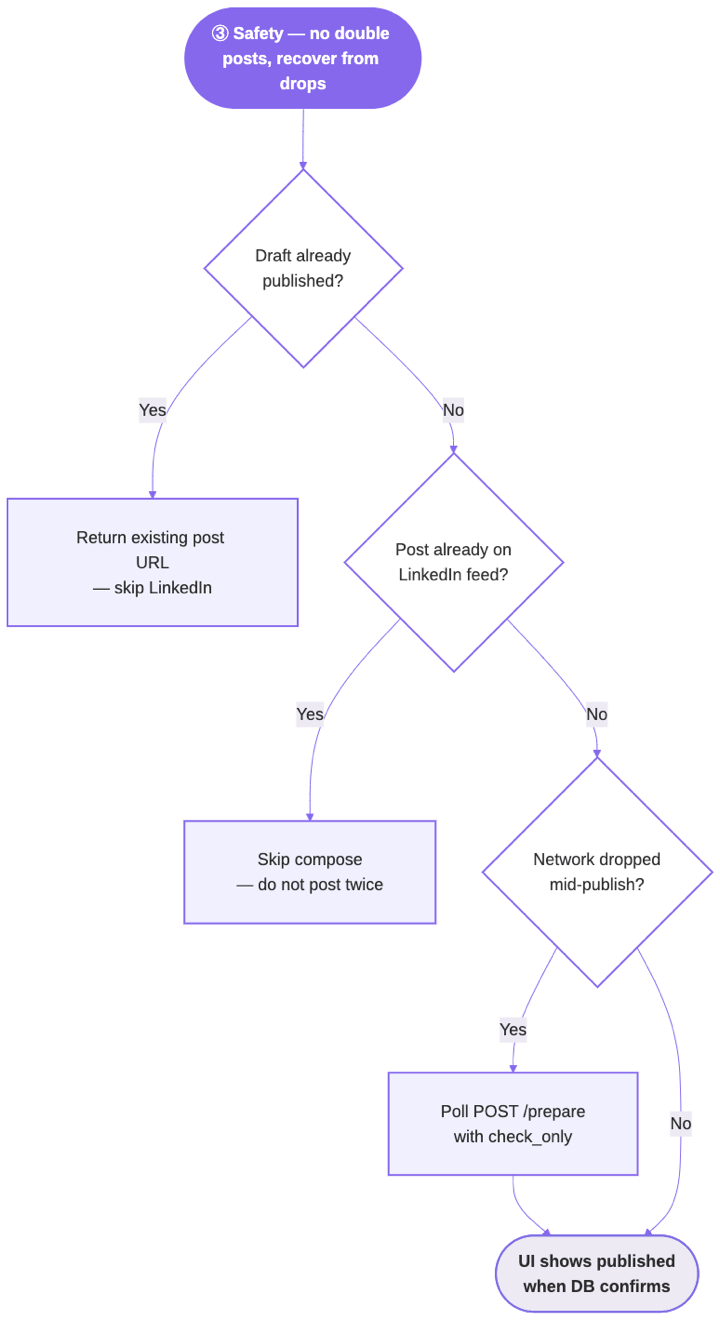
// waitForLinkedInPublished.js
// NOTE: useLinkedInPublish.js imports back from this module — a circular
// dependency. It is safe under ESM because both sides use the imported symbols
// only at call time (inside functions), so live bindings are resolved by then.
// If you prefer to break the cycle, hoist prepareLinkedInPost into a third module.
import { prepareLinkedInPost } from "../hooks/useLinkedInPublish.js";
import { SYNC_REST_TIMEOUT_MS } from "./syncRestConfig.js";

export const LINKEDIN_PUBLISH_POLL_INTERVAL_MS = 5000;

export function makeLinkedInPublishPollableError(message) {
  const err = new Error(message);
  err.linkedInPublishPollable = true;
  return err;
}

function isPublishedCheck(data) {
  return data?.already_saved === true && data?.social_status === "published";
}

export async function waitForLinkedInPublished(contentUuid, {
  timeoutMs = SYNC_REST_TIMEOUT_MS,
  pollIntervalMs = LINKEDIN_PUBLISH_POLL_INTERVAL_MS,
} = {}) {
  if (!contentUuid) {
    throw makeLinkedInPublishPollableError("Cannot verify LinkedIn publish — missing content_uuid.");
  }
  const deadline = Date.now() + timeoutMs;
  while (Date.now() < deadline) {
    // Transient failures (502/503, dropped request) are EXPECTED during the
    // reconnect window — swallow them and keep polling until the deadline.
    // Never let a single failed check abort the poll.
    try {
      const status = await prepareLinkedInPost(contentUuid, { checkOnly: true });
      if (isPublishedCheck(status)) {
        return {
          status: "SUCCESS",
          message: "Posted to LinkedIn successfully.",
          post_url: status.post_url,
        };
      }
    } catch {
      // ignore — server may still be mid-publish; retry on the next interval
    }
    await new Promise((r) => setTimeout(r, pollIntervalMs));
  }
  throw makeLinkedInPublishPollableError(
    "LinkedIn publish is still processing on the server. Check LinkedIn and refresh the table."
  );
}
Code language: JavaScript (javascript)
UI state machine (reference)
| Step | UI behavior |
|---|---|
checking | prepare({ checkOnly: true }) — if already_saved && published → copy post URL to clipboard, close modal; if already_saved && draft → jump to review; else → confirm |
confirm | Ask operator to generate copy |
generating | prepare() (LLM) — modal busy, no dismiss |
review | Editable textarea + cover thumbnail + “First comment — auto-posted” preview of article URL |
publishing | publish() — modal busy, publishLockRef prevents double submit |
done | Success modal; if warning or image_warning, show non-blocking notification (prefer warning first) |
Gate LinkedIn action in list: require cover_image_url and published article (article_status === 'published' or equivalent CMS flag).
Modal cannot close while checking | generating | publishing. Review shows empty-state copy when article URL not yet available.
Constraints checklist (implementer / agent)
| # | Constraint | Failure mode |
|---|---|---|
| 1 | Image ≥ 512 B + valid magic bytes | Post click no-op, composer open |
| 2 | Fill text after image + Next | Empty Quill, silent post failure |
| 3 | Scoped Post inside .share-creation-state | Clicks Repost |
| 4 | Wait upload settle (~3 s stable) | Intermittent composer stuck |
| 5 | verify_post_submitted before comment | Link on wrong / no post |
| 6 | Goto clean posts_published_url (no ?share=true) | Comment trigger not found |
| 7 | Match post card by first-line snippet | Comment on stale top post |
| 8 | press_sequentially for comment URL | Comment never saves |
| 9 | Wait Comment button :not([disabled]) | Silent no-op click |
| 10 | Verify comment in card scope only | False positive from editor text |
| 11 | Link in comment, not body | Reach penalty (product choice) |
| 12 | Fresh li_at + Cookies file ≤ 14 days (session_is_healthy) | Login redirect mid-flow |
| 13 | 60 min client + 3600 s proxy timeout | False “Load failed” |
| 14 | Company admin URL uses numeric ID | 404 |
| 15 | Headless Chrome preferred | Chromium blocked more often |
| 16 | Session init headed Chromium only | macOS hang with channel=chrome |
| 17 | Partial success → HTTP 200 + warning | Operator thinks post failed |
| 18 | LinkedInError → JSON 502; unexpected errors → 500 | Frontend parse errors / false hard-fail |
| 19 | Never session-init / interactive login during deploy, CI, or SSH — refresh locally first | Pipeline hangs waiting for human at browser |
| 20 | POST_MAX_CHARS 3000 enforced at Playwright entry | LinkedIn rejection |
| 21 | check_only returns already_saved: false when no draft | Poll must not treat as published |
| 22 | Company preflight on personal feed before company URL | False login-negative on company chrome |
| 23 | Both warning and image_warning in partial responses | UI misses image-only skip message |
| 24 | Preflight skips feed probe when li_at on disk | False auth-negative on headless /feed/ |
| 25 | Prepare requires published article URL + configured LinkedIn account | 400 before LLM runs |
| 26 | LLM copy: 700 chars + hook ≤60 + 3-hashtag formula | Bad copy reaches review UI |
| 27 | Comment trigger fail → save PNG and HTML dump | Hard to debug admin feed DOM |
| 28 | Deploy rsyncs session dir only when session-health passes locally; warn-and-skip if stale | Stale cookies on server; silent publish failures |
| 29 | Post-submit steps raise only LinkedInError; retry ≥ 2 re-checks feed before composing | Transient error after submit → duplicate post |
| 30 | Reconnect poll swallows transient prepare errors and keeps polling to deadline | One 502 aborts the poll, false “still processing” |
Timeouts reference (recommended values)
| Layer | Timeout | Notes |
|---|---|---|
| Playwright default per locator | 30 s | page.set_default_timeout |
| Image editor Next | 90 s | advance_past_image_editor |
| Media upload settle | 120 s | 3 s stable Post-ready |
| Post verify (composer close) | 60 s | verify_post_submitted |
| Resolve post card in feed | 90 s | 10 s first wait, then 5 s |
| Comment submit enabled | 25 s | wait_for_comment_submit_ready |
| Comment verify in card | 20 s | 2 s poll interval |
Client fetchSyncRest | 60 min | AbortController |
| nginx publish routes | 3600 s | reverse proxy |
| Reconnect poll interval | 5 s | LINKEDIN_PUBLISH_POLL_INTERVAL_MS |
Failure modes and debug playbook
Most of these are the same failure in a different costume: a success signal someone accepted without verifying the state behind it.
| Symptom | Likely cause | Fix |
|---|---|---|
| Composer stays open after Post | Corrupt/ tiny image or empty body | Validate bytes; fill after attach |
| “Success” but no post | Assumed click = success | Add verify_post_submitted |
| Comment on wrong post | Blind top-of-feed click | Snippet-scoped card |
| Comment trigger missing | Still on ?share=true | Force goto clean feed URL |
| Comment typed, not saved | execCommand or disabled submit | press_sequentially; wait enabled |
| UI “Load failed”, post exists | Client/proxy timeout | sync REST + poll |
| 502 but post on LinkedIn | Old handler treated comment fail as error | Return SUCCESS + warning |
| Two identical posts | Transient error after submit → full-flow retry re-posted | Post-submit steps raise only LinkedInError; post_already_live check on retry ≥ 2 |
| Reconnect poll gives up early | prepare check threw on a transient 502 | Wrap poll check in try/catch; keep polling to deadline |
Image preview but no <img> | Invalid file passed extension check only | Magic byte validation |
On failure, write full-page PNG + HTML to tmp/linkedin_debug/ (timestamped). Comment-trigger failures save both artifacts. Inspect Post disabled, aria-disabled, .ql-editor.ql-blank.
Testing strategy
1. Probe (no publish)
Open composer → attach real JPG/PNG (>512 B) → click Next → do not Post. Confirms selectors.
2. E2E test post
post_to_linkedin(
    account="brand_page",
    message="TEST — DELETE ME",
    image_path="/path/to/valid.jpg",
    link="https://example.com/your-article",
    headless=True,
)
Code language: PHP (php)
Pass: no exception; logs show composer closed, snippet matched, comment URL verified. Manual: delete test post on LinkedIn.
Run three consecutive greens before enabling publish in your UI.
3. Unit tests (no browser)
validate_linkedin_image_filerejects tiny/corrupt files- Comment selector lists include
:not([disabled])on submit buttons cover_image_for_content(or equivalent) validates bytes after HTTP download — never raises; yieldsNonefor text-only fallbackvalidate_linkedin_post(or equivalent) enforces 700-char / hook / hashtag formula before reviewvalidate_messagerejects empty and >3000-char bodies (platform limit, distinct from the 700-char copy rule)- Poll predicate:
already_saved && social_status === 'published' waitForLinkedInPublishedkeeps polling when apreparecheck throws (mock a 502 mid-loop → still resolves on a later published check)- Retry ≥ 2 with the post already live calls the comment path only —
submit_postis not invoked twice (mockpost_already_live→ True) session_is_healthy/session_has_auth_token/is_session_fresh(14)— filesystem checks, no browser- REST handler returns HTTP 200 +
warningwhen post succeeded but comment failed (not 502)
Suggested repository layout
your_app/
  linkedinlib/
    accounts.py       # LINKEDIN_ACCOUNTS
    selectors.py      # all selector lists
    session.py        # launch context, li_at check, session_init
    image.py          # validate, attach, advance_past_editor, upload_settle
    post.py           # fill_post_content, submit_post, verify_post_submitted
    comment.py        # resolve card, add_first_comment, verify_comment
    errors.py         # LinkedInError
    publish.py        # post_to_linkedin, retries
  api/
    linkedin_prepare.py
    linkedin_publish.py
  web/
    syncRestConfig.js
    syncRestFetch.js
    syncRestPaths.js
    useLinkedInPublish.js
    waitForLinkedInPublished.js
  data/linkedin_sessions/   # gitignored Chromium profiles (rsync to prod when healthy)
  tools/
    linkedin_ops.sh         # session-init, session-health, session-status, smoke post
  tmp/linkedin_debug/       # gitignored failure artifacts
Code language: PHP (php)
Validation record (July 2026 field test)
The following was verified on a company page admin account:
- [x] Native image attach (JPG cover, >512 B, valid magic)
- [x] Post body without URL
- [x] Article URL as first comment on that post
- [x] Standalone automation script exit 0 (attach → post → comment)
- [x] Full UI flow: prepare → review → publish (same backend library)
- [x] Reconnect poll after long publish
Root causes discovered during validation (all addressed in this guide — note that every one of them presented as “working” before it presented as broken):
- 57-byte
.jpgwith invalid bytes → silent Post failure - Text-before-image → Quill wiped after crop
?share=trueURL → comment UI absent- Missing
button[aria-label='Comment']as first trigger on admin feed
Summary for implementers
- Login once (headed Chromium) → verify
session_is_healthy→ post headless (prefer Chrome channel). Refresh locally and rsync profile before deploy when stale. - Prepare / Publish split with operator review between.
- Download + validate cover bytes → attach → fill → Post → verify → comment.
- Scope every selector to composer or target post card.
- Comment with keyboard events; wait for enabled submit; verify in card scope.
- Never trust Post click until composer closes.
- Long timeouts + poll on frontend; partial success is still success.
- Maintain selectors — LinkedIn changes admin DOM without notice.
Replace route names and DB fields with your own; keep the order, guards, and contracts unchanged.
One honest caveat. The selector lists in this guide are a snapshot — LinkedIn will change the admin DOM, probably without telling anyone, and some of those arrays will go stale. When that happens, the guards are what save you, not the selectors: the run fails loudly with a PNG and an HTML dump instead of publishing nothing and reporting success.
Because that is the actual thesis. Every guard in this guide is the same guard — never accept the success signal, verify the state. Composer closed. Card on the feed. Comment inside the card. Build it that way, and a Phantom Success can’t survive past the next check.

- Your Coding AI Agent Deleted A Login Security Check - October 14, 2026
- Your Outreach AI Agent Booked a Demo With No Buyer - October 7, 2026
- Your Hiring AI Agent Sourced Candidates For A Cursed Seat - October 1, 2026